Animate GIF Maker Online

Animate GIF Maker Online

Animation Creative Drawing
Developer: Golden Core Games
Published: 2025-06-23
Updated: 2026-06-12

Reviews

Animate.Space offers an intuitive and enjoyable experience for making animations. The unlimited frames and easy tools make it great for beginners, while features like ghost preview help create smooth results. It's a fantastic, family-friendly game that sparks imagination without any hassle.

Game Introduction

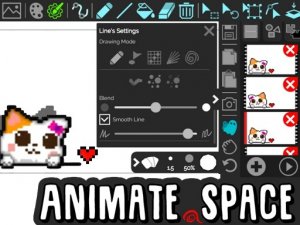
Animate.Space is a creative online tool that allows you to make your own animated GIFs, cartoons, and flipbooks directly in your browser. It is designed for anyone who wants to explore the art of animation without needing advanced software. The core objective is to bring your ideas to life through frame-by-frame animation. What makes it unique is its accessibility: no sign-up is required, and there are no watermarks on your creations. This makes it a safe, family-friendly platform for both kids and adults to express their creativity.

How to Play

To get started, simply open Animate.Space in your web browser. You will find a set of drawing tools that let you create the first frame of your animation. After that, you can add new frames to build a sequence. The interface allows you to copy, paste, or delete frames as needed. You can also select, move, rotate, or resize objects within a frame to refine your artwork. For smoother animations, you can use features like autoframe drawing, which helps create transitions, and ghost preview, which shows the previous frame as a guide. When your animation is complete, you can save it as an animated GIF or share it online.

Game Features

Animate.Space offers a variety of features to support your animation projects. These include unlimited frames, a paint bucket tool, an eraser, and both pixel and vector shapes. You can manage frames easily with copy, paste, and delete options. The editor also provides tools to select, move, rotate, and resize objects, along with unlimited undo actions. Additional features like autoframe drawing, ghost preview, and line control help you create smooth, professional-looking animations. The final output can be saved as an animated GIF, and you can share your work online. There are no watermarks and no sign-up requirements.

Tips for Success

To get the most out of Animate.Space, start by planning a simple animation idea. Practice using the drawing tools to become familiar with how they work. Use the ghost preview feature to see the previous frame, which helps in creating smooth motion. Experiment with autoframe drawing to create transitions between frames. Take advantage of the unlimited undo feature to try different effects without fear of making mistakes. Finally, save your work regularly and share your animations with others to get feedback and inspiration.

Compatibility

๐Ÿ’ป Desktop | ๐Ÿ“ฑ Mobile | ๐Ÿ“Ÿ Tablet
โ€“ All supported ยท Best with Chrome or Safari
Faq
Is Animate.Space free to use?
Yes, Animate.Space is free to use. You can create and save animated GIFs without any cost. There are no hidden fees or subscription requirements, and you do not need to sign up for an account. This makes it accessible to everyone who wants to try animation.
Do I need to download any software?
No, you do not need to download anything. Animate.Space runs entirely in your web browser. As long as you have an internet connection and a modern browser, you can start creating animations immediately. This makes it convenient and easy to use on different devices.
Can I share my animations on social media?
Yes, you can share your animations online. After creating your animated GIF, you can save it to your computer and then upload it to social media platforms, websites, or forums. The tool does not add watermarks, so your creations are clean and ready to share.
What file format does the animation save as?
The animation is saved as an animated GIF file. GIF is a widely supported format that can be viewed on almost any device or platform. This makes it easy to use your animation in presentations, websites, or social media posts.
Is there a limit on the number of frames I can use?
No, there is no limit on the number of frames. You can create animations with as many frames as you need. This allows you to make complex, detailed animations without worrying about running out of space. The tool is designed to support long and creative projects.
Can I use this tool on a tablet or smartphone?
Animate.Space is designed to work in a web browser, so it may be usable on tablets and smartphones, depending on the device and browser. However, for the best experience, a computer with a mouse or stylus is recommended due to the precision needed for drawing and editing frames.
Advertisement

Related Games

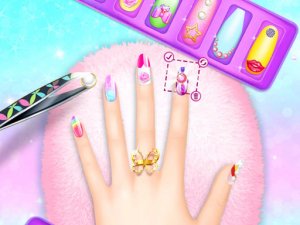
Nail Salon 3D: Creative Nail Art Simulator

Nail Salon 3D: Creative Nail Art Simulator

Kids

Relaxing and creative. Easy controls and lots of design options. Great for all ages.

Fashion Selfie Dress Up Fun

Fashion Selfie Dress Up Fun

Dress Up

Charming dress-up game with a fun phone cleaning twist. Easy to play and visually appealing. Perfect for quick creative breaks.

Fashion Legends Dress Up

Fashion Legends Dress Up

Dress Up

Colorful and easy to play. A relaxing dress up game that encourages creativity.

Puppy Dress Up Designer

Puppy Dress Up Designer

Kids

A calm and creative pet design game. Simple controls and endless options make it enjoyable for all ages.

Chelsea Dress Up Fashion Game

Chelsea Dress Up Fashion Game

Dress Up

Simple dress-up game with many cute items. Great for quick creative play.

Pony Dress Up 2: Creative Dress Up Game

Pony Dress Up 2: Creative Dress Up Game

Casual

Simple drag-and-drop controls and cute ponies. A relaxing game for creative play.

Ballerina Cappuccina Date Dress Up

Ballerina Cappuccina Date Dress Up

Dress Up

Many outfit choices and a sweet story. Easy to play and relaxing.

Barbie Art Teacher Drawing Game

Barbie Art Teacher Drawing Game

Girl

Clear lessons and diverse tools make drawing fun. Great for creative play and learning art styles.

Snowgirl Glam-Up Dress Up Game

Snowgirl Glam-Up Dress Up Game

Dress Up

Easy to play with lots of outfit choices. Great for a quick creative break.

Circus Wedding Dress-Up Game

Circus Wedding Dress-Up Game

Dress Up

Charming and creative wedding dress-up game. Great for kids and anyone who loves customization.

Tom and Jerry Blast Off Drawing Game

Tom and Jerry Blast Off Drawing Game

Arcade

A creative drawing game that rewards careful tracing with smoother flying. Great for young children.
Freddie Dress Up Fashion Game

Freddie Dress Up Fashion Game

Dress Up

Easy to play and full of outfit choices. A relaxing way to explore fashion creativity.

Animate GIF Maker Online

Animate GIF Maker Online

Animation

A fun and safe online tool for creating animated GIFs, perfect for kids and families to explore creativity.